

3. Checking the connection from a PC
Check the IP address of the device, and access it from a PC by using the Web browser.
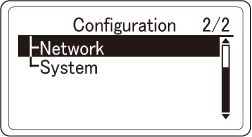
- Press the scroll button ▼ on the operator panel to check that [Configuration] is selected, and then press «OK».
Press ▼ several times to select [Network], and then press «OK».
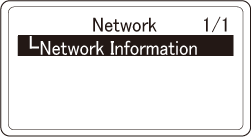
Check that [Network Information] is selected, and press «OK».
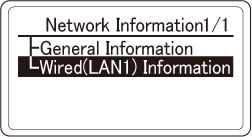
Press ▼ to select [Wired(LAN1) Information], and then press «OK».
Press ▼ to select [IPv4 Address], and then press «OK».
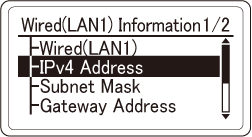
- Take a note of the displayed IP address.
- Start the web browser in your PC.
Input "http:// (The IP address recorded in Step 6)", and press the «Enter» key. Connection is successful when the web page of this machine is displayed.


- If the web page of this machine is not displayed, the network connection between the PC or other terminals and this machine has failed.
Check if [IP Address Set], [IPv4 Address], [Subnet Mask] and [Gateway Address] of this machine are set correctly.
- If the web page of this machine is not displayed, the network connection between the PC or other terminals and this machine has failed.
Then, go to "Installing software on a PC".