

Check the replacement time of maintenance parts and apply for a free one
The Monitoring Tool periodically checks the machine's status and displays the following screen as the maintenance part is approaching its service life. Click [Apply] in the maintenance part column and follow the procedure to apply for maintenance parts.

- It is necessary to complete user registration.
- It is necessary to replace the maintenance part.
- The maintenance parts include the maintenance kit (the fuser and the transfer roller) and the feed roller assembly.
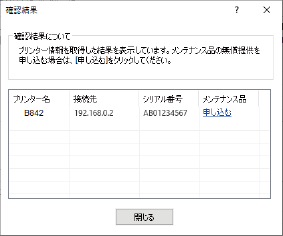
To apply for COREFIDO free maintenance parts service, please refer to the "COREFIDO Guide" or visit the website (https://www.oki.com/jp/printing/).
- Select [Start] - [OKI] - [Monitoring Tool] to start the Monitoring Tool.
Click [Confirm].
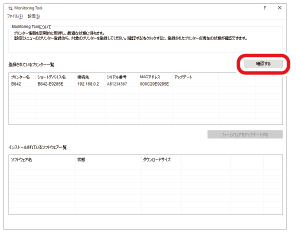
The confirmation result screen will be displayed. If you get the printer available to sign up for a free maintenance part, click [Apply].
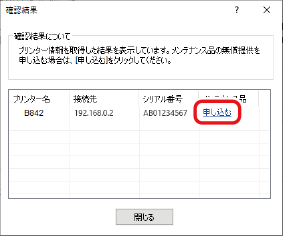
Select the maintenance part which you want to sign for, and click [Apply].

- User registration is required for applying for COREFIDO free maintenance parts service. If user registration has not been completed, click [User registration] and register on the website on the displayed website.
- When "Don't show the notification message again" is checked, the system will hide the notification message from the end of the service life to the replacement of the maintenance part.
- When replacing the paper feed roller, check the usage status of each feed roller of the Monitoring Tool. The pop-up screen for replacing the paper feed roller is not displayed.
- The website is displayed. Follow the on-screen instructions to complete the application procedure.