

Parts identification of the operator panel
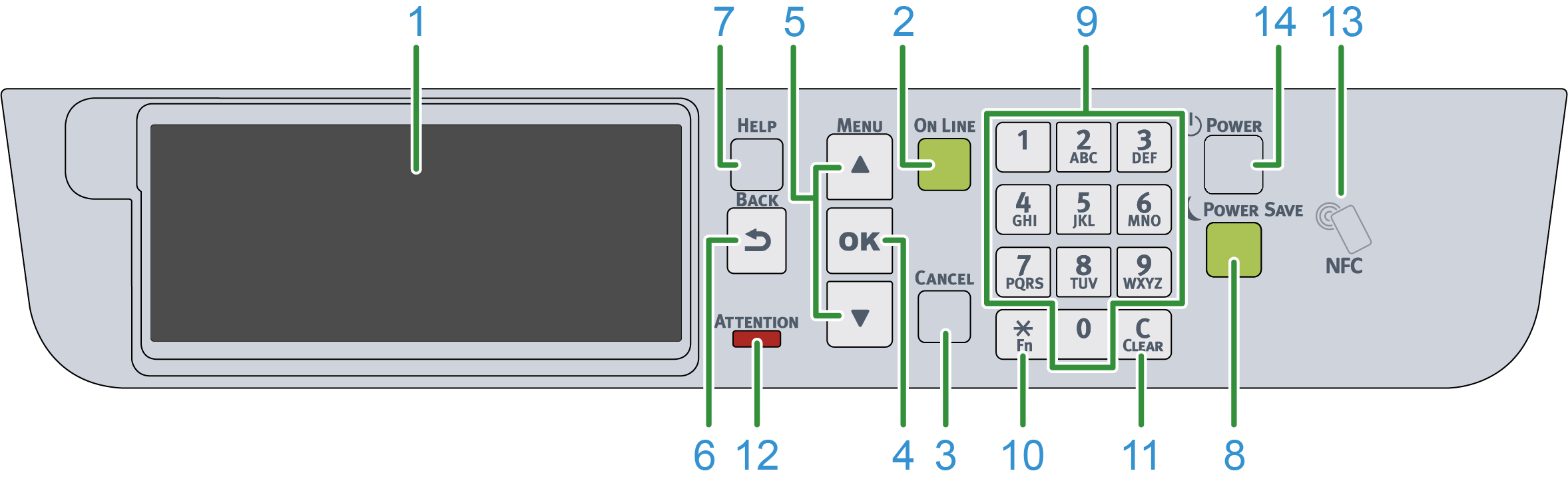
No. | Name | Function |
|---|---|---|
1 | Display | Display the state of this machine and operation instructions. There are two types of standby screens: "Show Remaining Toner" and "Show Tray Information". The factory default setting is "Show Remaining Toner". |
2 | «ONLINE» button | Press it to switch between online and offline. It lights green when online, and goes off when offline. |
3 | «CANCEL» button | Press it to cancel the current printing. Press it to go back to the standby screen when the menu is displayed. |
4 | «OK» button | Press it to confirm the highlighted item. |
5 | Scroll button ▲/▼ | Used to select a menu or scroll the screen display. It can be used to input numbers in the numerical input screen. |
6 | «BACK» button | Press it to go back to the previous screen. |
7 | «HELP» button | Press it to display the help screen. To close the screen, press the «HELP» button again, or press the «BACK» or «CANCEL» button. |
8 | «POWER SAVE» button | Press it to turn on or off the power save mode. Press it to cancel the sleep mode. It lights on in green in the power save mode, and flashes in green in the sleep mode. |
9 | Numeric keypad | Used to input alphanumeric characters or symbols. |
10 | «Fn» key | Used to display the shortcut menu. Fn: The abbreviation for "Function". |
11 | «CLEAR» key | Long or short press the key to perform the following actions according to the item to input.
* Disabled when the IP address is input. |
12 | ATTENTION lamp | Indicate the state of this machine. Light off in the normal state. On: Indicate that a minor error has occurred. Blinking: Indicate that a major error has occurred. |
13 | NFC mark | When using the NFC function, bring your mobile device close here. For details about the NFC function, please refer to "Printing from a mobile device". |
14 | Power switch | Turn on/off the power of this machine. |