

For the Windows PCL printer driver
[Setup] tab
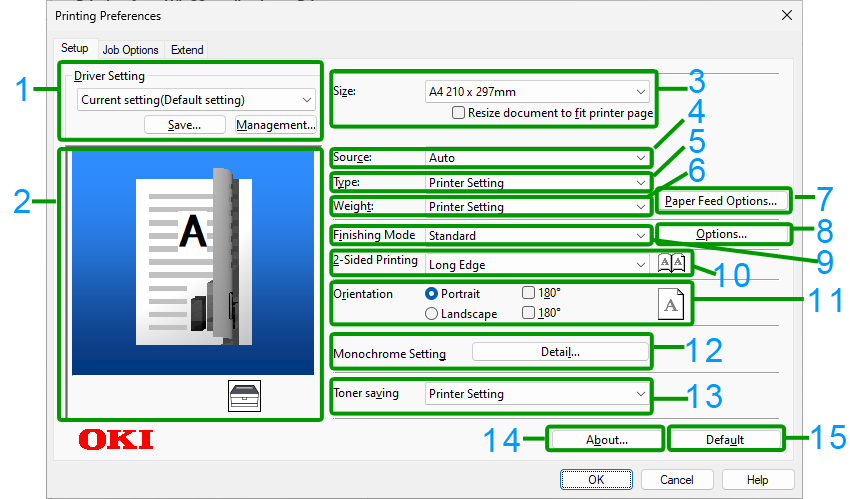
No. | Item | Description |
|---|---|---|
1 | Driver Setting | Save the settings. |
2 | Layout image | Display a sample image of the print layout. |
3 | Size | Set the paper size. |
4 | Source | Set the paper source. |
5 | Type | Set the media type. |
6 | Weight | Set the media weight. |
7 | Paper Feed Options | You can make detailed settings for paper feeding. |
8 | Options | You can make detailed settings for the layout. |
9 | Finishing Mode | Set multi-page printing, booklet printing, poster printing, etc. |
10 | 2-Sided Printing | Set the duplex printing. |
11 | Orientation | Set the printing orientation. |
12 | Mono Settings | Adjust the brightness during mono printing. |
13 | Toner Saving | Decrease the print density to reduce the amount of toner to be used. |
14 | About | Display the version of the printer driver. |
15 | Default | Restore the settings of each item in the tab to the initial values. |
[Job Options] tab
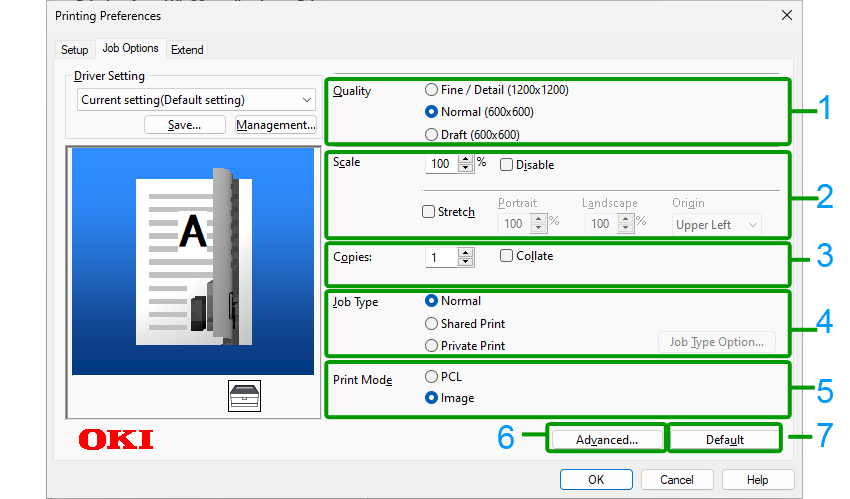
No. | Item | Description |
|---|---|---|
1 | Quality | Specify the print resolution. |
2 | Scale | Set the enlargement/reduction of printing. |
3 | Copies | Specify the number of copies. |
4 | Job Type | Set the type of printing. |
5 | Print Mode | Set whether the print data sent to the printer is in PCL format or as an image. |
6 | Advanced | Make other printing settings. |
7 | Default | Restore the settings of each item in the tab to the initial values. |
[Extend] tab
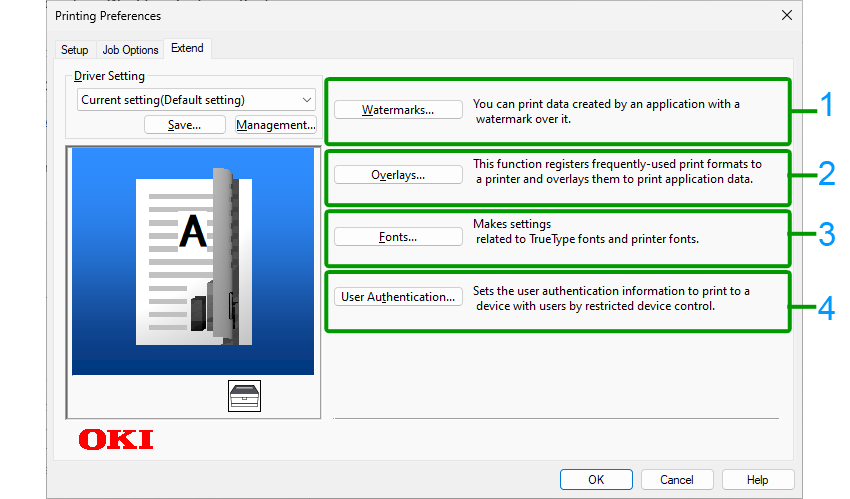
No. | Item | Description |
|---|---|---|
1 | Watermarks | Set it for printing with a text or stamp watermark. |
2 | Overlays | Set it for printing with an overlapping print format registered in the printer beforehand. |
3 | Fonts | Set the TrueType font and printer font. |
4 | User Authentication | Set the user authentication. |