

Specifying a Destination (Direct Entry)
You can directly enter a destination fax number by using the numeric keypad.
Memo
Specify a destination in step 4 in "Sending a Fax (Procedure)".
-
Press [Manual Dial] in the [Fax] tab.
-
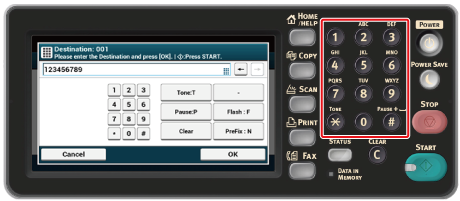
Enter a destination fax number by using the numeric keypad or the numeric buttons.
You can enter up to 40 digits.
-
Press [OK].
About the Dial Function
When entering a destination fax number, you can use the following functions.
"-", "Prefix", and "Flash"
Enter each sign by pressing its sign displayed on the fax number entry screen.
-
- (Hyphen)
Inserts a hyphen to the entered fax number.
-
Prefix
Inserts a prefix number that is registered in advance. "N" is inserted when entering.
-
Flash
Orders your PBX (Private Branch Exchange) to connect you with PSTN (Public Switched Telephone Network). "F" is entered when entering.
"Pause", "#"
Enter with the < # > key on the numeric keypad. Pressing the < # > key switches between "P" and "#".
-
Pause
Pauses 2 seconds when dialing. You can enter as many pauses as you want. "P" is inserted when entering.
-
# (Pound)
Sends "#" to the telephone line if [MF(Tone)/DP(Pulse)] is set to [Tone]. "#" is inserted when entering.
"Tone", "*"
Enter with the < * > key on the numeric keypad. Pressing the < * > key switches between "T" and "*".
-
Tone
Switches to tone dialing if [MF(Tone)/DP(Pulse)] is set to [Pulse]. "T" is inserted when entering.
-
* (Asterisk)
Sends "*" to the telephone line if [MF(Tone)/DP(Pulse)] is set to [Tone]. "*" is inserted when entering.