

For details on available paper, see "Supported Paper".
-
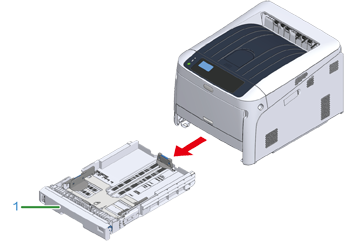
Pull out the paper cassette (1).
-
Set the paper size dial (2) to match the loading paper size.
Set the dial to [A4
 ] when loading the A4 size paper with a landscape orientation.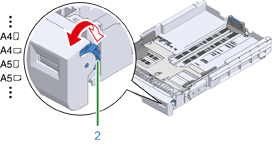
Memo
-
If the size of paper cannot be found in items of the dial, set "Other".
Note
-
If you draw the cassette with the printer power on, the paper size, paper type, and paper thickness of the tray are sometimes displayed on the panel.
If you change paper, change the settings to the appropriate values. You can change the setting to hide the screen. To hide the tray paper size message, select [Admin Setup] > [Panel Setup] > [Paper setup when paper exchange] and set it to [Off].
-
Make sure to match the size of paper and that on the paper size dial. Otherwise, paper size error occurs and printing cannot be done.
-
For size of paper which can be loaded either horizontal or vertical such as A4, please be careful of the direction.
-
-
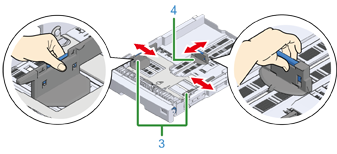
Slide the paper guide (3) and paper stopper (4) to the size of paper to be loaded.
-
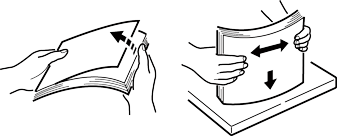
Fan a stack of paper well, and then align the edges of the paper.
-
Load paper with the print side face down.
Note
-
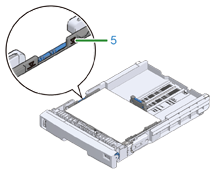
Do not load paper above the "
 " mark (5) on the paper guide.
-
-
Secure the loaded paper with the paper guide.
-
Check if a size of loaded paper matches the setting of paper size dial.
Note
-
If the size of paper and that on the paper size dial do not match, paper size error occurs and printing cannot be done.
-
-
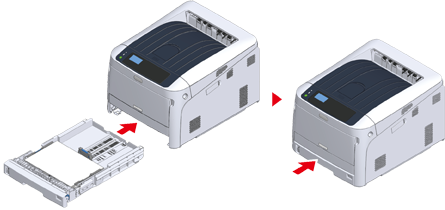
Return the paper cassette to the printer.
-
If paper that cannot be selected from the sizes on the paper size dial (the dial setting: [Other]) is loaded, set paper size to [Custom] on the operator panel and enter the width and length of paper.
See "Printing on Custom Size Paper".
Memo
-
If the size of paper whose size can be found on the dial such as A3 and A4, set [Cassette Size]. [Cassette Size] is set by factory default and you do not need to change for normal use.
-