-
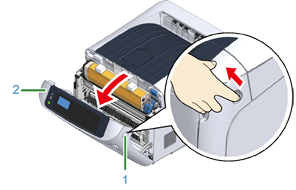
Insert your finger into the recess on the right side of the printer and pull the front cover open lever (1) to open the front cover (2) forward.
Note
-
Open the front cover gently. If opening rapidly, an MP tray may open.
-
-
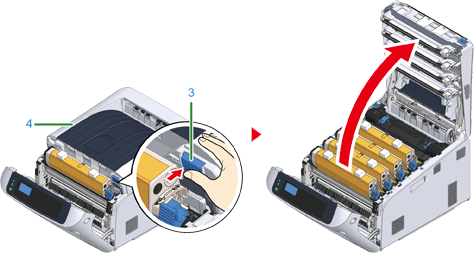
Press the open button (3) and open the output tray (4).
-
Prepare flat surface covered with sheets of newspaper, etc. to remove protective sheets from the image drums set in the printer.
-
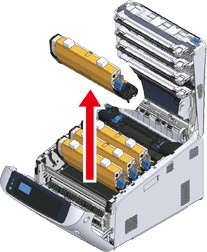
Take the image drum "K: Black" set forward with the toner cartridge attached and put it on the surface prepared in step 3.
Memo
-
Image drums are not locked on the printer. It can be removed by lifting it up.
Note
-
The starter toner cartridges are shipped with the image drums attached. Please do not remove starter toner cartridges from the image drums.
-
-
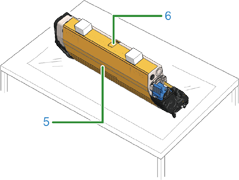
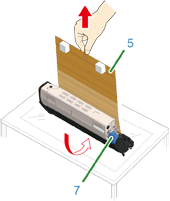
Remove the protective sheet (5) from the image drum.
-
Remove a tape (6) stuck on a protective sheet (5) and open it.
-
Draw the protective sheet (5) in the direction of the arrow. Do not turn the toner cartridge lock lever (7) (blue).
-
-
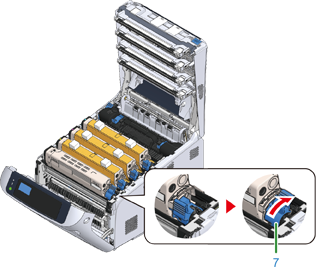
Put the image drum with the protective sheet removed into the printer unit and turn the toner cartridge lock lever (7) (blue) in the direction of the arrow until it lines up with the
 .
.You will hear a click when it is locked in place.
Note
-
Closing the cover without turning the toner cartridge lock lever (blue) may cause a malfunction. Make sure to turn the cartridge lock lever until it lines up with the
in the far end.
-
-
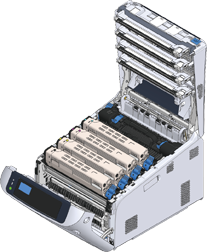
Repeat from step 4 to step 6 to pull out all the image drum and remove all the protective sheet in the order of "Y: Yellow", "M: Magenta", and "C: Cyan". And put them back to the printer, then turn the toner cartridge lock lever.
-
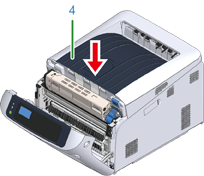
Close the output tray (4) by pushing the center of the cover firmly.
-
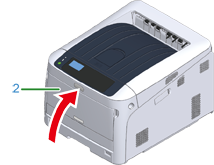
Close the front cover (2).
Note
-
The front cover cannot be closed securely if the output tray is not closed.
-
When the error message that the top or front cover is open does not disappear from the operator panel’s display screen, make sure they are closed securely.
-
 Web Manual