

Windows XPS Printer Driver
You can switch between the [Setup] and [Job Options] tabs for settings.
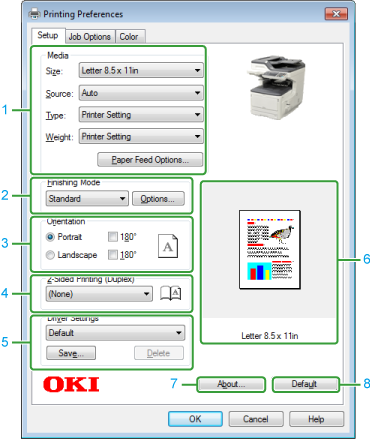
[Setup] Tab
|
|
Item |
Description |
|---|---|---|
|
1 |
Media |
Specifies the paper size, type, weight, paper feed method, or other settings. |
|
2 |
Finishing Mode |
Specifies the multi-page printing, booklet printing, and poster printing. |
|
3 |
Orientation |
Specifies the printing direction. |
|
4 |
2-Sided Printing (Duplex) |
Specifies when you want to use 2-Sided Printing. |
|
5 |
Driver Settings |
Saves your settings. |
|
6 |
Preview |
Displays a preview image of the printed result. |
|
7 |
About |
Displays the version of the printer driver. |
|
8 |
Default |
Resets the settings on the tab to their default settings. |
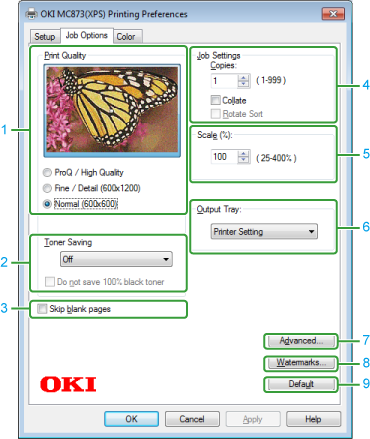
[Job Options] Tab
|
|
Item |
Description |
|---|---|---|
|
1 |
Print Quality |
Specifies the resolution for printing. |
|
2 |
Toner Saving |
Decreases the print density to save toner. |
|
3 |
Skip blank pages |
Does not print blank pages by selecting this check box. |
|
4 |
Job Settings |
Specifies the number of copies and other settings to print. |
|
5 |
Scale |
Specifies the enlargement/reduction rate for printing. |
|
6 |
Output Tray |
Specifies output destination of printouts. |
|
7 |
Advanced |
Displays the Advanced screen. |
|
8 |
Watermarks |
Specifies when you want to use stamp print. |
|
9 |
Default |
Resets the settings on the tab to their default settings. |
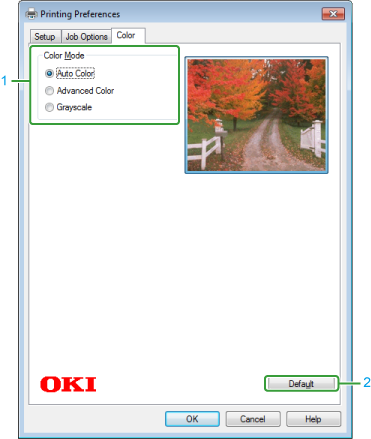
[Color] Tab
|
|
Item |
Description |
|---|---|---|
|
1 |
Color Mode |
Specifies the color printing method. |
|
2 |
Default |
Resets the settings on the tab to their default settings. |