

You can adjust the print start position vertically and horizontally on the paper for each tray.
Note
-
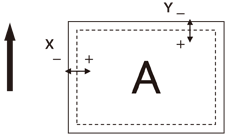
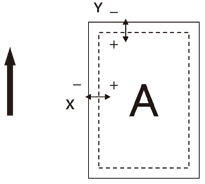
A bold arrow in the illustration indicates the paper feed direction.
-
Y indicates the paper feed direction and X indicates its orthogonal direction.
-
To widen the margins in either X and Y direction, press [+].
-
Depending on the usage conditions (temperature and humidity/media type), you may need readjustment.
-
This function is for adjusting the printing position and does not increase accuracy of the writing start position (±2 mm).
-
Press the «Fn» key.
-
Press the function number of the tray to adjust, and press the «ENTER» button.
Memo
-
The function number for each tray is listed below.
Target Tray
Function No.
MPTray
220
Tray1
221
Tray2
222
Tray3
223
Tray4
224
Tray5
225
-
-
Press the scroll button
 or
or  , and select the item to adjust.
 -
Press the «ENTER» button.
-
Press the scroll button
or to select the adjustment amount, and press the «ENTER» button. Check that * is displayed to the left of the selected value. -
Press the «ON LINE» button, return to the standby screen.