

This manual is composed of the top page and body pages in each category.
Top Page
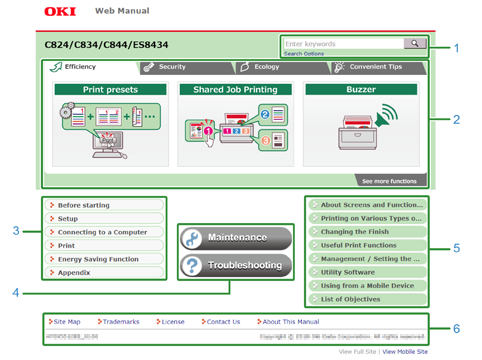
The top page is the first page that is displayed when you open this manual.
|
Number |
Item |
Description |
|---|---|---|
|
1 |

|
Searches for a word in this manual. |
|
2 |
Make It More Convenient |
Put your mouse over to display "See details". Click to display useful functions. Switch four tabs to search for functions. |
|
3 |
Basic Operation |
Describes notes, installation tips, and settings on the machine. |
|
4 |
Maintenance |
Describes how to replace consumables and how to clean this machine. |
|
Troubleshooting |
Describes how to solve problems. |
|
|
5 |
Setting Items |
Describes how to set up this machine and register information before using. |
|
6 |
Site Map |
Displays the site map of this manual. |
|
Trademarks and Other Information |
Displays the trademarks in this manual. |
|
|
License |
Displays the software license agreement and other licenses. |
|
|
Contact Us |
Displays the contact information. |
|
|
About This Manual |
Supplies various information about how to use this manual, requirements, etc. |
Content Page
|
Number |
Item |
Description |
|---|---|---|
|
1 |
Table of Contents Area |
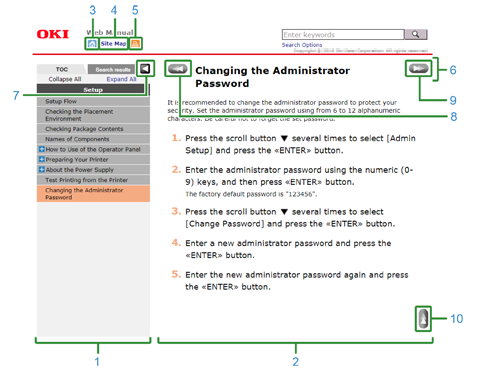
Displays a topic in a category in the content area by clicking a topic title. Some categories, such as Error Message Search do not have the contents area. |
|
2 |
Content area |
Displays a topic. |
|
3 |

|
Returns to the top page. |
|
4 |
SITE MAP |
Displays the site map of this manual. |
|
5 |

|
Prints the selected topic. |
|
6 |
Topic Title |
Indicates the title of the displayed topic. |
|
7 |
|
|
|
8 |

|
Displays the previous topic. |
|
9 |

|
Displays the next topic. |
|
10 |

|
Returns to the top of the displayed topic. |
 /
/ 