

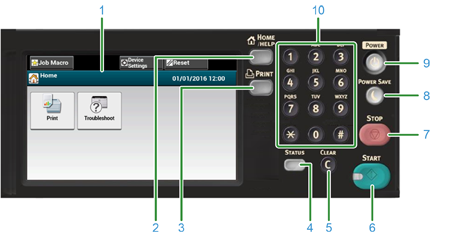
This section describes the names and functions of components on the operator panel.
|
No. |
Name |
Function |
|---|---|---|
|
1 |
Touch panel |
Allows you to select or set an item by pressing a displayed icon. |
|
2 |
HOME/HELP button |
Displays the home screen. |
|
3 |
PRINT button |
Displays the print function screen. |
|
4 |
STATUS button |
Displays the status menu. Flashes/lights up if there is an error status. You can check the remaining amount of consumables. |
|
5 |
CLEAR button |
Clear the entered value. |
|
6 |
START button |
Starts printing from USB Memory. |
|
7 |
STOP button |
Cancels printing. |
|
8 |
POWER SAVE button |
Enters or exits the power saving mode. In Power Save mode, lights up in green; In Sleep mode, flashes in green (every 3 seconds); In Deep Sleep mode, flashes in green (every 6 seconds). |
|
9 |
POWER button |
Turns on or off this machine. |
|
10 |
Numeric keypad |
Enters numbers and symbols. |
Note
-
When changing the angle of the operator panel, use care not to let your hands be caught between this machine and the operator panel. Injury may result.
-
Do not press the touch panel hard or poke it with a pointed object. It may damage the touch panel and cause malfunction.