

|
|
Item |
Description |
|---|---|---|
|
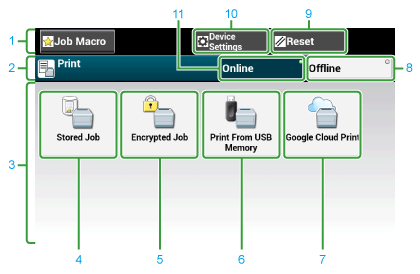
1 |
Stationary button area |
Displays buttons that appear on the screen at all times. |
|
2 |
Title and operation guide area |
Displays the title of the current screen and provides guide for possible operations. |
|
3 |
Main area |
Displays shortcut buttons for using certain print functions. |
|
4 |
[Stored Job] |
Prints a password-protected document stored in the machine. |
|
5 |
[Encrypted Job] |
Prints a password-protected and encrypted document stored in the machine. |
|
6 |
[Print From USB Memory] |
Prints a print data stored in USB Memory directly. |
|
7 |
[Google Cloud Print] |
Prints a print data received from Google Cloud Print manually. |
|
8 |
[Offline] |
Switches this machine offline. |
|
9 |
[RESET] |
Returns the settings for the current print job to their default settings. |
|
10 |
[Device Settings] |
Specifies various settings such as Administrator Setting. |
|
11 |
[Online] |
Switches this machine online. |
|
|
Item |
Description |
|---|---|---|
|
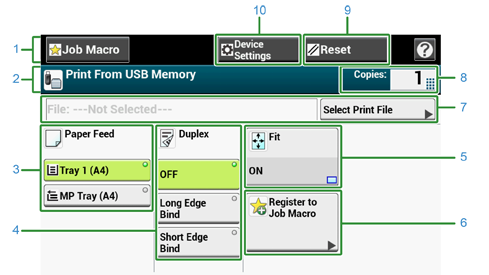
1 |
Stationary button area |
Displays buttons that appear on the screen at all times. |
|
2 |
Title and operation guide area |
Displays the title of the current screen and provides guide for possible operations. |
|
3 |
Paper Feed |
Specifies the tray to set the copy paper. |
|
4 |
Duplex |
Prints on the both sides of paper. |
|
5 |
Fit |
Prints adjusting the page size to fit the selected paper. |
|
6 |
Register to Job Macro |
Registers current settings to Job Macro. |
|
7 |
Select Print file |
Select files to print. |
|
8 |
Copies |
Specifies the number of copies to make. |
|
9 |
Reset |
Returns the settings for the current copy job to their default settings. |
|
10 |
Device Settings |
Specifies various settings such as Administrator Setting. |